6. Bottom Panels
Three panels sit at the bottom of the Fast DDS Monitor Pro window, providing notification, problem reporting, and a live entity counter.
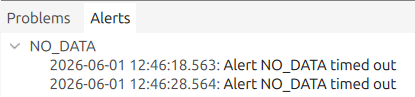
6.1. Alert Messages Panel
The alert messages panel is located in the collapsible section at the bottom of the application window. It lists the alerts triggered by the application in a tree structure, grouped by the name of the alert rule that produced them. Messages are shown with the most recent entries at the bottom. Each entry shows the alert message and the timestamp of when the alert was triggered.
6.2. Problem Summary
The Problem Summary is a collapsible section at the bottom of the main panel. It lists all detected problems per entity, including data samples lost, incompatible QoS between endpoints, and missed DataWriter deadlines. Where applicable, the problem entry includes a link to the relevant documentation.
Entities with reported problems also display a warning or error icon next to their name in the Explorer Panel and in the Domain View.

6.3. Entity Summary Bar Pro
The Entity Summary Bar is a compact counter strip in the bottom status bar of the window. It shows the total number of the four main DDS entity types discovered across all active monitors, giving a quick read of the network at a glance without opening any panel.
The bar shows four labelled counters inline:
P - total number of DomainParticipants discovered.
W - total number of DataWriters discovered.
R - total number of DataReaders discovered.
T - total number of distinct DDS Topics discovered.
All four values aggregate across every active monitor tab and update automatically as entities are discovered or removed. When the Show Proxy Entities option is enabled in the View menu, a blue asterisk appears after the counters to indicate that proxy entities are included in the totals.
Hovering over the counter strip shows a tooltip that expands the four values into a labelled list under the heading Entities discovered, writing out each entity type by its full name. When proxy entities are visible and at least one proxy entity of a given type exists, the tooltip shows the proxy count in parentheses next to the total for that type.